Client Download
- Download the TAMS Multi Store client (Version 1.96.01)
- Download the BigFix Client
- Download certificate to access PPSE (PartsPRO) in HTTPS mode
Requests and Forms
- @napacanada Account Creation / Modification / Deactivation Request Form
- Request to unblock a webpage (iBoss Exception)
- NAPA VPN at Home Request
Email or TEAMS Access on a Mobile Device
Execute all steps in the following order:
- MFA Configuration with Authenticator
- Enrollment of your device on the company portal iPhone | Android
- Outlook Mobile Installation
Job Aides
- Check computer compatibility with Windows 11 (PC Health Check)
- Counter PC replacement instructions
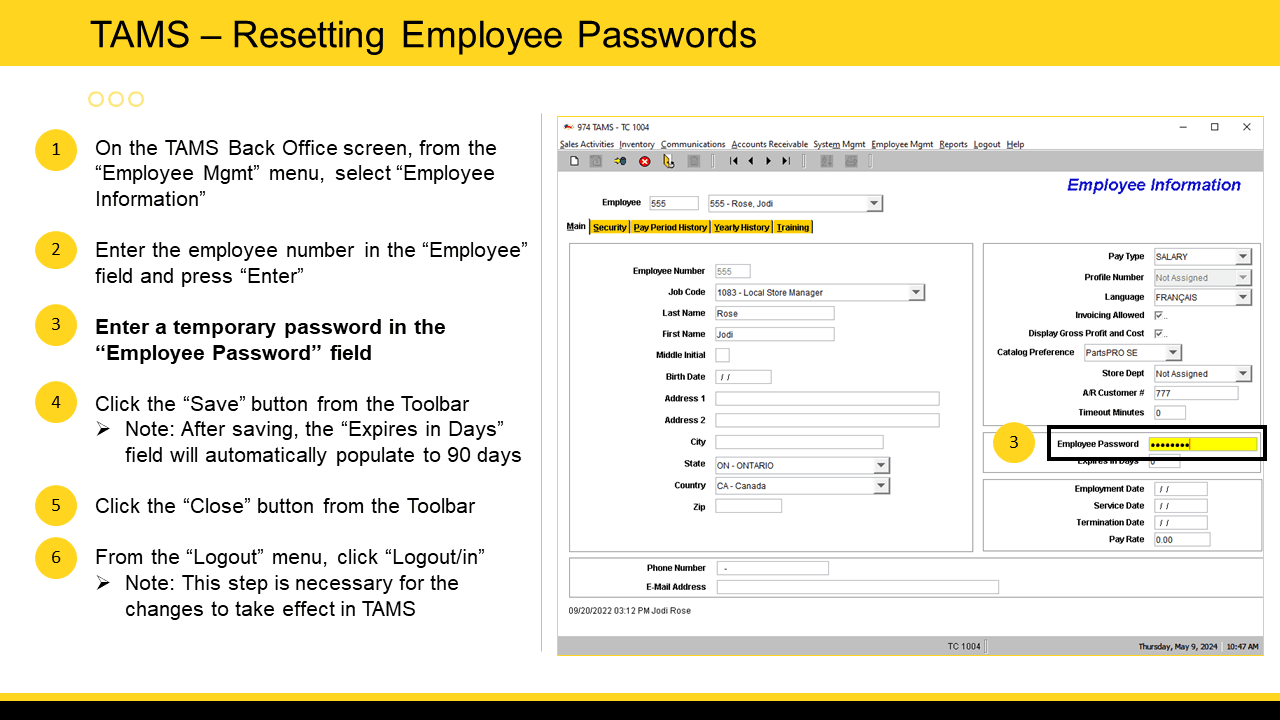
- Reset a TAMS Password (For Associate Stores Only)
- Process Stock Receipt Reports (COM 150)
Reset a TAMS Password
NOTE: Only Associate stores can perform this task. Corporate stores must contact their regional office for any update to employee settings.